How to assign the PCN organisation Role within CQRS National
After CQRS has calculated each PCN’s Achievement Points and Achievement Payments for indicators extracted from GP systems, before payments can be made (i) PCNs must declare these data and calculations, and (ii) these declarations must receive commissioner and financial approval.
In order to enable timely declaration, please ensure you have two nominated persons within CQRS. Commissioners can give a CQRS user the power to make declarations on behalf of a PCN by assigning the PCN organisation role to them.
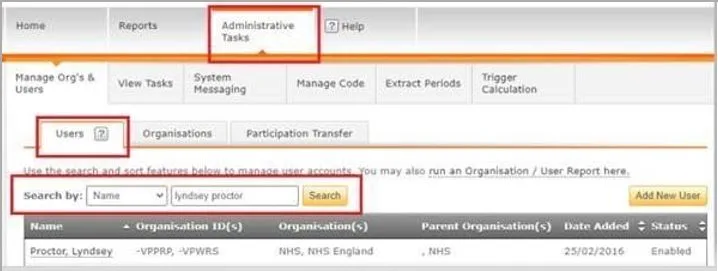
Commissioners can assign the PCN organisation role to a user within the Administrative Tasks and User Management tab. Please see the following steps on how to add the PCN to the nominated persons CQRS account:
- Search for the user in CQRS and click into their account
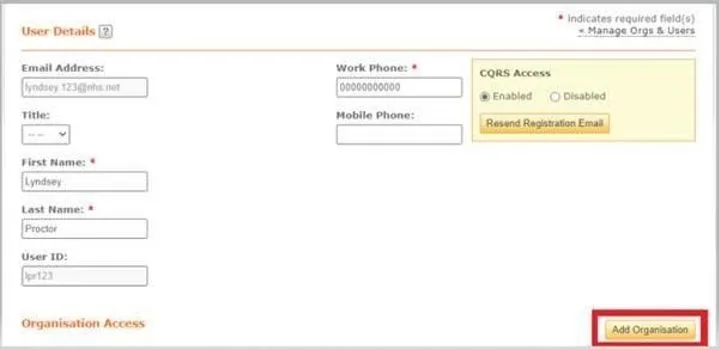
- Click ‘add organisation’
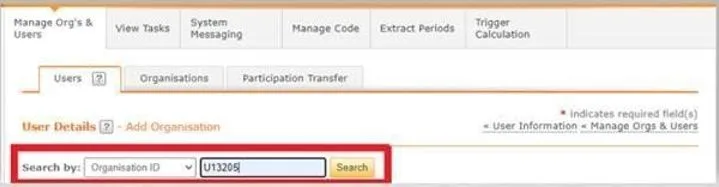
- Search by ‘organisation ID’ and enter the PCN code, click search
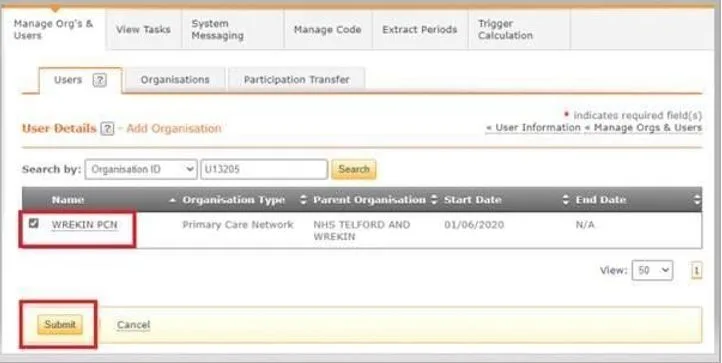
- Tick the check box for the PCN and click submit
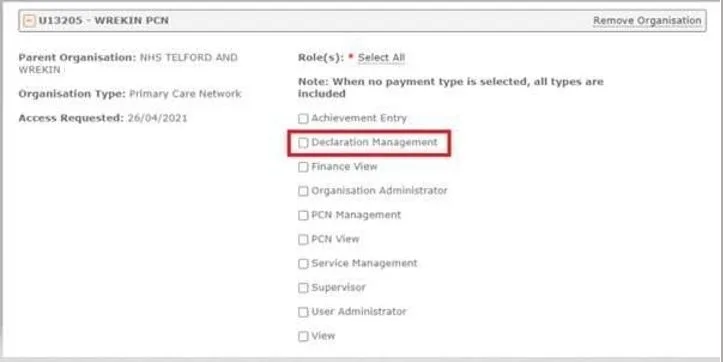
- The nominated person will require the ‘declaration management’ permission to declare the achievement on behalf of the PCN
- Click submit at the bottom of the page

Non-urgent advice: Need help?
If you need help with CQRS, you can log a call with the service desk. Please email: support@cqrs.co.uk or call 0330 124 4039.